DWBouncers/Clients/AdiIRC: Difference between revisions
< DWBouncers | Clients
m Protected "DWBouncers/Clients/AdiIRC" ([Edit=Allow only administrators] (indefinite) [Move=Allow only administrators] (indefinite)) [cascading] |
|||
| Line 47: | Line 47: | ||
* Double-check your username format (<code>username/network</code>). | * Double-check your username format (<code>username/network</code>). | ||
* Ensure SSL is enabled on port 31337. | * Ensure SSL is enabled on port 31337. | ||
* If you cannot connect, verify your credentials on | * If you cannot connect, verify your credentials on '''ZNC WebAdmin:''' ➡️ https://bouncers.darkworld.network or [[DWBouncers/Soju|Soju Panel]]. | ||
== See Also == | == See Also == | ||
Revision as of 15:35, 20 November 2025
DWBouncers/Clients/AdiIRC Setup Guide
This page explains how to configure DWBouncers/Clients/AdiIRC to connect with DWBouncers (ZNC or Soju).
Requirements
- A valid DWBouncers account (ZNC or Soju)
- Server details: Template:DWBouncerServers
- Username format:
- For ZNC:
username/network - For Soju:
username
- For ZNC:
- Your assigned password
Connection Settings
| Setting | Value |
|---|---|
| Server | bouncers.darkworld.network
|
| Port | 31337 (SSL) or 1337 (non-SSL) |
| SSL | Yes (recommended) |
| Username | username/network
|
| Password | Your DWBouncer password |
Step-by-Step Setup
- Open DWBouncers/Clients/AdiIRC.
- Click Quick Connect.
- Add a new server/network entry:
- Server:
bouncers.darkworld.network - Port:
31337and enable SSL. - Username:
username - Password:
username/darkworld:yourzncpassword
- Save the configuration.
- Click Log On.
Example Screenshot
-
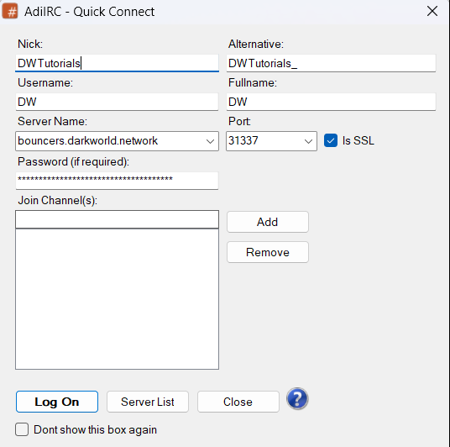 Example server configuration in DWBouncers/Clients/AdiIRC

Troubleshooting
- Double-check your username format (
username/network). - Ensure SSL is enabled on port 31337.
- If you cannot connect, verify your credentials on ZNC WebAdmin: ➡️ https://bouncers.darkworld.network or Soju Panel.
See Also
Part of the DarkWorld Network Wiki Project Maintained by the DarkWorld Wiki Team
DarkWorld Network — Building an Open, Secure, and Collaborative Internet Since 2021
🌍 Connect with Us:
 |
|
 |
|
 |
|
 |
|
 |
|
 |
|

Quick Links: 🏠 Home • 💬 DWIRC • 🔗 DWBouncers • 💻 DWShells • 📘 Tutorials • 📈 Stats • 🎮 Games • 🧭 Hosting
💡 Want to contribute? See How to Contribute and help build the DarkWorld knowledge base!
📅 Last Updated: 2025-11-20 • Content licensed under CC-BY-SA 4.0 unless otherwise noted.